Trust and Security at Analytify: Safeguarding Your Insights
Empowering Secure Collaboration with Role-Based Dashboard Sharing inAnalytify
In today’s data-driven world, ensuring the right people have access to the right data is
paramount. At Analytify, we have implemented robust security features to empower
seamless collaboration without compromising the safety of your data.
One of our standout features is Role-Based Dashboard Sharing, designed to provide
granular control over who can access and interact with your dashboards. Let’s explore
how this feature works and why it’s critical for your business.
What is Role-Based Access Control (RBAC)?
-
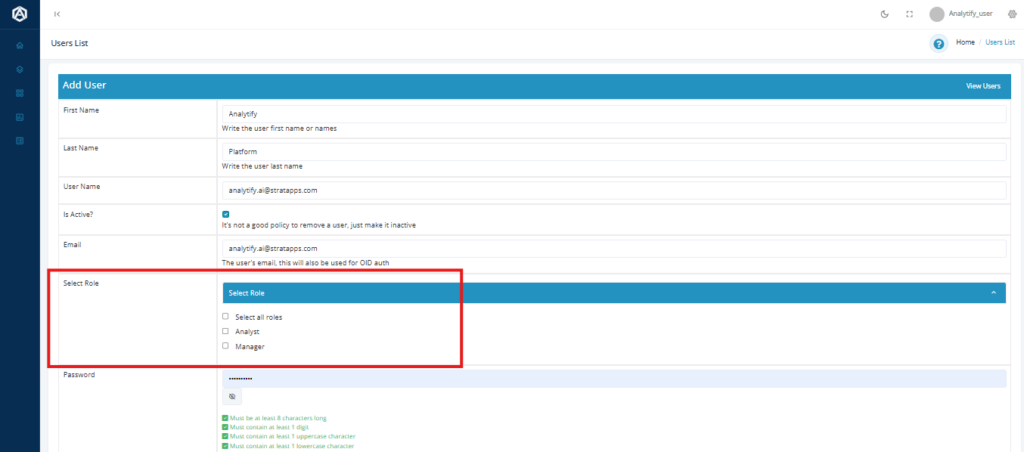
Assign Users Roles:
Roles like “Admin,” “Manager,” or “Analyst” can be assigned to users, each with predefined
privileges to their responsibilities.
-
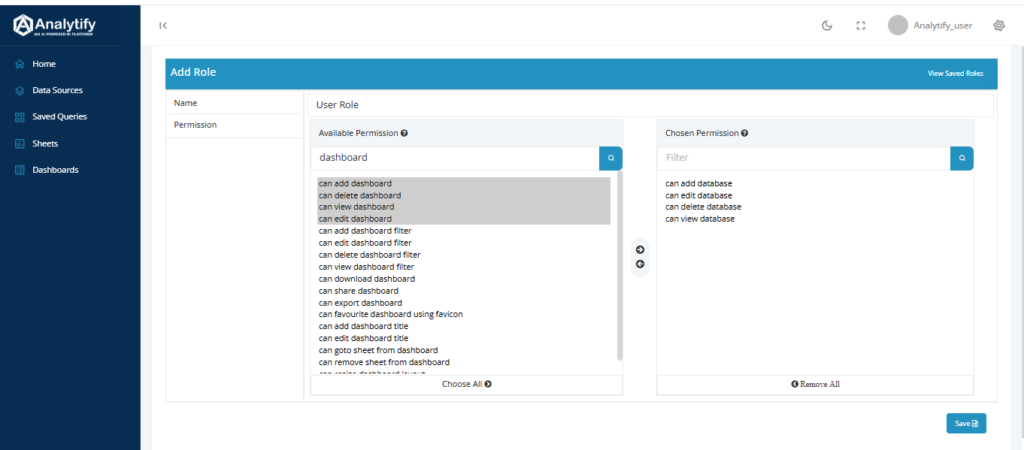
Privilege Management:
Administrators can define privileges for each role, controlling who can view, edit specific
dashboards.
-
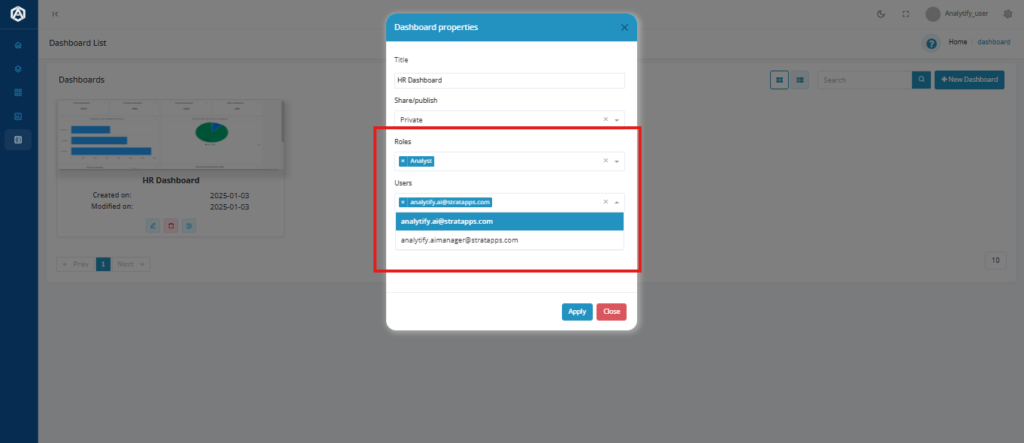
Dashboard-Level Permissions:
Dashboards can be shared on a need-to-know basis. For example:
Within dashboard properties, we have private and public shares.
For private sharing, choose the role and select the users with whom the dashboard needs to
be shared and the respective user will have access to the dashboard based on privileges
listed out for that role.
For public sharing, a dynamic public link will be generated for viewing the dashboard.
Granular Sharing Options
Analytify does not limit itself to simple “share or don’t share” models but allows fine-tuned
sharing controls:
● User-Specific Access: Share dashboards directly with specific users.
● Read-Only or Editable Access: Decide whether users can view the dashboard or
have editing permissions” for clarity.
Why Role-Based Sharing Matters
Role-based dashboard sharing does more than add security-it also makes work more
efficient:
● Less Risk of Exposure: Protect sensitive information from being accessed without
permission.
● Simplified Workflows: Minimize unnecessary noise for team members by sharing only
what they need.
Use Case: Role-Based Sharing in Action
Imagine a business that has several departments and teams:
● The CEO needs to have a high-level dashboard in terms of performance metric
covering the company level.
● The Marketing Manager needs deep campaign analytics, but only for their
department.
● The Finance Team should only view budget dashboards.
With Analytify Role-Based Dashboard Sharing, each user sees only what they need to
ensure productivity without sacrificing security.
Conclusion: Making Secure Collaboration Simple
At Analytify, we believe that collaboration and security go hand-in-hand. With Role-Based
Dashboard Sharing, our feature enables teams to work efficiently in high standards of data
protection. Control access with roles and privileges. Share insights across your organization
without trading safety for its efforts.
Start securing your data today at Analytify where safety meets innovation.
See Analytify embedded inside a live SaaS product.
Get a 30-minute walkthrough. Open-source, multi-tenant, enterprise-ready.